
Building SyauOS: A Web Desktop Environment with Nepali Culture and Vanilla CSS
- Author: Kantaraj Luitel (Susant)
- Role: High School Developer & Student from Nepal (2nd Place Winner, Hack Club Campfire Kathmandu 2026)
- Tech Stack: React 19, TypeScript, Zustand, Web Audio API, Vanilla CSS, IndexedDB
- Live Demo: https://shyayos.kantarajluitel.com/
- Source Code: https://github.com/susantedit/shayu-OS
1. Overview
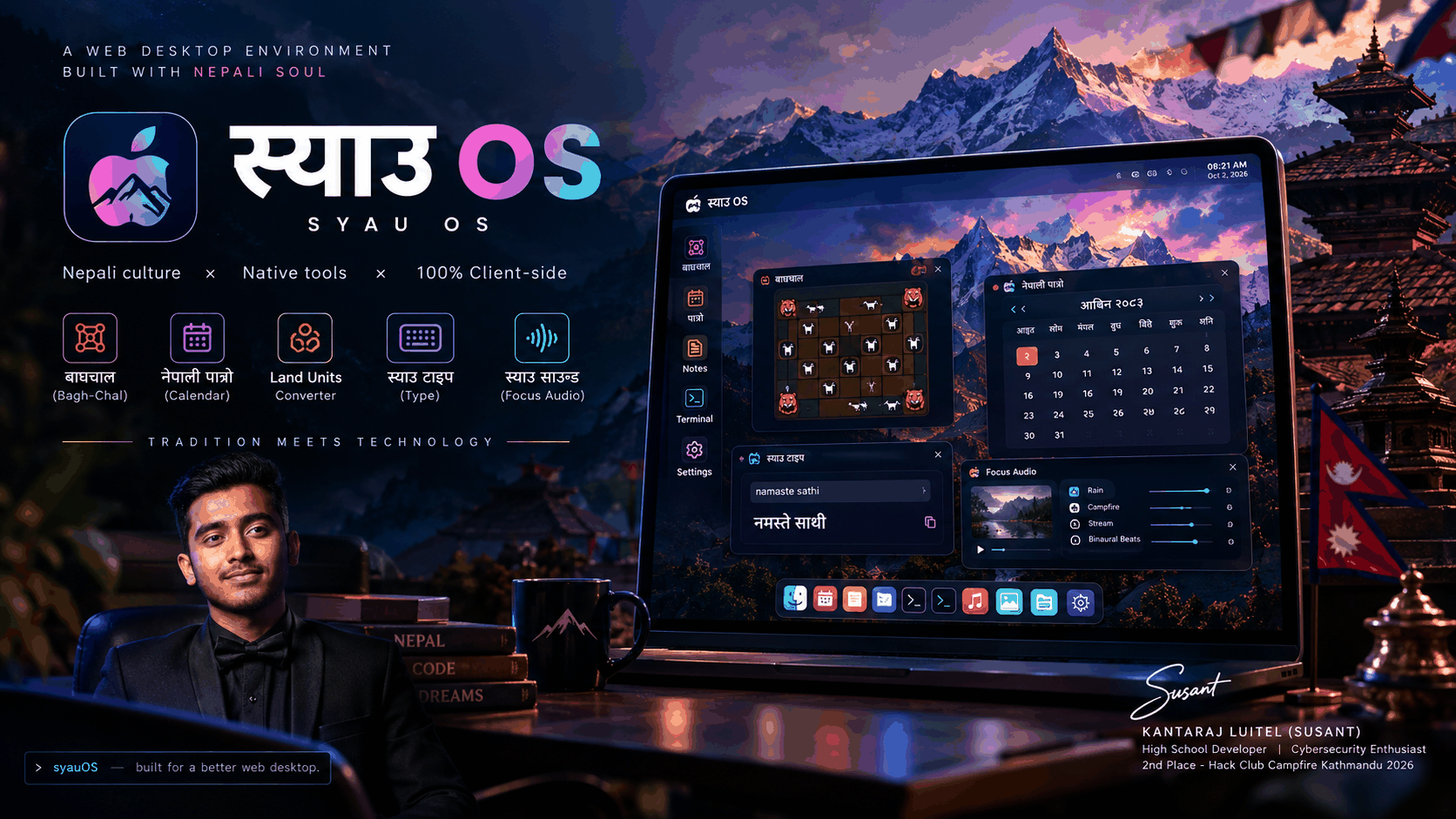
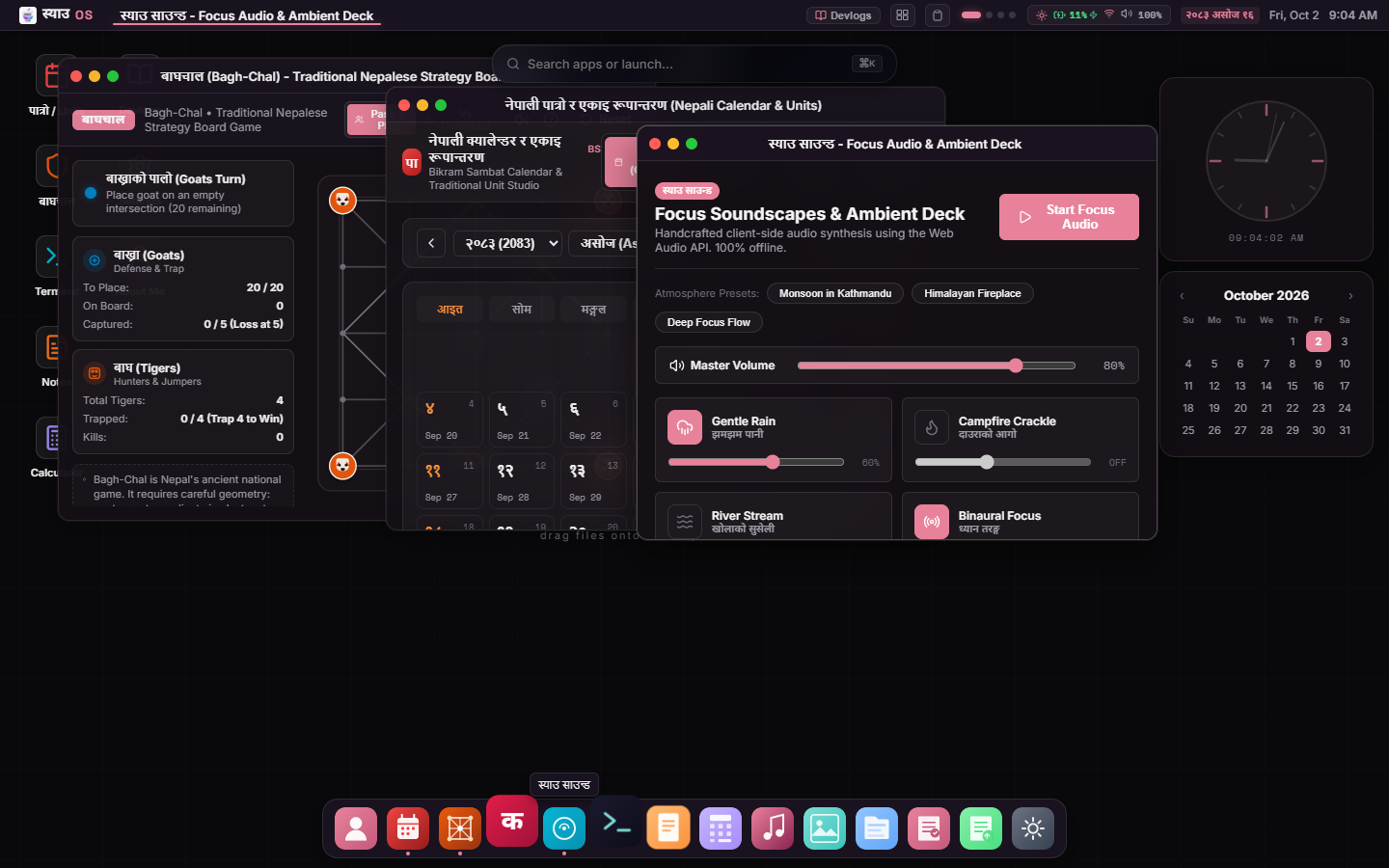
SyauOS ("स्याउ" means "Apple" in Nepali) is a browser-based desktop environment built with React 19, TypeScript, and Zustand. It presents a desktop metaphor inspired by macOS, complete with a top menu bar, draggable and resizable windows, a magnification dock, virtual workspaces, an application launcher, and an interactive shell.
Many web desktop experiments fall into one of two traps. Some are purely visual mockups with non-functional placeholder windows. Others are thin graphical wrappers built around third-party AI chat APIs.
I wanted to explore a different direction: building a lightweight, client-side operating system environment that solves real technical challenges while grounding its identity in Nepali culture and everyday utilities.
The project brings together:
- A custom window manager supporting dynamic z-index stacking, edge snapping, geometry restoration, and virtual workspaces.
- A complete Bikram Sambat (BS) calendar engine with AD/BS date conversion.
- Non-decimal mathematical converters for traditional Nepali land units (Pahad and Terai) and gold weights.
- The ancient strategic board game Bagh-Chal (बाघचाल) with 5x5 board geometry, straight-line jump capture detection, and a greedy heuristic bot.
- A real-time phonetic Romanized-to-Devanagari typing engine (Syau Type) with direct export into a markdown notepad.
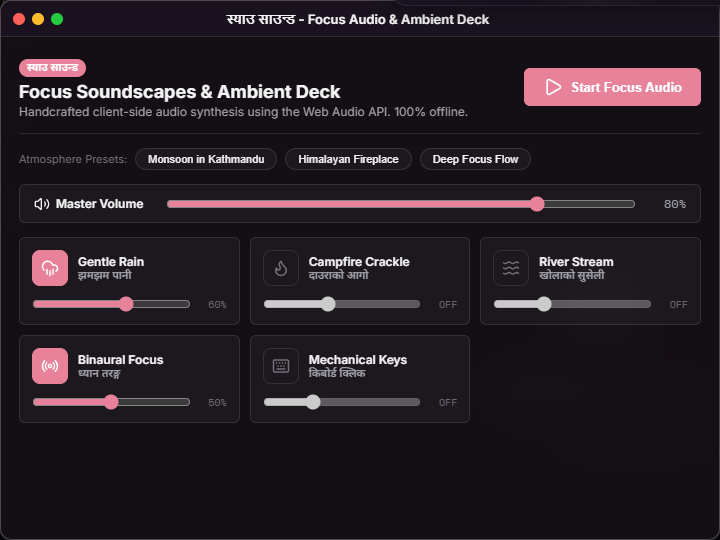
- Procedural audio synthesis powered by the browser's native Web Audio API, generating startup chimes, ambient monsoon rain, campfire crackles, and binaural focus frequencies without loading external audio media files.
- A virtual Unix-style file hierarchy backed by IndexedDB.
- A modular styling system written in pure Vanilla CSS using custom properties, with zero CSS frameworks or utility runtime dependencies.
Every tool runs locally in the browser with zero backend requirements and no API keys.
2. The Idea Behind SyauOS
The name "स्याउ OS" started as a lighthearted play on words. In Nepal, "स्याउ" (pronounced Syau) translates directly to "Apple". Calling a web desktop स्याउ OS was a nod to macOS, but it quickly became an opportunity to build software that felt authentic to where I grew up.
Most software tools used in Nepal are designed for Western or international contexts. The Gregorian calendar is standard on computers, even though government offices, national holidays, and daily life in Nepal run on the Bikram Sambat calendar. Typing in Nepali on physical keyboards usually requires memorizing the non-standard Preeti keyboard layout or installing separate desktop IME packages. Buying land involves calculating conversions across non-decimal regional systems (Ropani, Aana, Paisa, Daam in the hills, or Bigha, Kattha, Dhur in the plains) that standard calculator apps cannot handle.
I decided to combine these utilities into a cohesive desktop environment. Rather than building separate web pages for each utility, integrating them into an operating system interface allowed me to experiment with application lifecycle management, inter-app communication, and browser storage persistence.
The project was developed for Hack Club Campfire Kathmandu in 2026, where it won 2nd place.
3. What You See When SyauOS Starts
When you open SyauOS, the system walks through an intentional startup pipeline before presenting the desktop.
The Boot Pipeline
Instead of rendering the entire UI at once, src/App.tsx coordinates a staged boot sequence:
BootScreen.tsxdisplays an Apple-style progress bar that completes in 1.4 seconds.- At boot start,
playBootChime()synthesizes a warm C-major chord (C4, E4, G4, C5) directly through the Web Audio API using four sine oscillators with linear attack and exponential decay. - Once progress reaches 100% (or the user clicks to skip),
setBootDone(true)updates the desktop store. - The desktop mounts its components sequentially: the top bar appears after 100ms, the desktop canvas and background clock after 300ms, and the dock springs in from the bottom after 500ms.
The Desktop Shell
- Top Bar (
TopBar.tsx): Displays an OS menu, the active window title, workspace indicators, and a system tray. The tray includes physical battery level detection usingnavigator.getBattery(), an active network status monitor with real-time latency ping testing, audio mute toggles, a clipboard history popover, and the current date with an interactive tooltip showing the equivalent Bikram Sambat date. - Desktop Surface (
Desktop.tsx): Renders an icon grid with automated collision detection to prevent overlapping icons, custom right-click context menus with boundary safety checks, and an HTML5 Canvas analog clock widget with sweeping second hands. - Floating Dock (
Dock.tsx): Houses application shortcuts. Hovering over icons triggers a cosine-squared proximity scaling animation. Active applications display a subtle indicator dot beneath their icon. - Spotlight Launcher (
SearchBar.tsx): PressingCmd+KorCtrl+Kopens a global spotlight modal that allows searching and launching all 14 system applications using keyboard arrow keys.
System Architecture
graph TD
    User([User Interaction]) --> TopBar[TopBar Component]
    User --> Desktop[Desktop Surface]
    User --> Dock[Dock Component]
    User --> SearchBar[Spotlight Launcher Cmd+K]

    TopBar --> DesktopStore[Zustand: desktopStore]
    Desktop --> DesktopStore
    Dock --> DesktopStore
    SearchBar --> DesktopStore

    DesktopStore --> WindowManager[Window Component]
    WindowManager --> SuspenseBoundary[React Suspense & ErrorBoundary]
    SuspenseBoundary --> AppHost[Dynamic Application Host]

    AppHost --> Apps[Core Applications: BaghChal, NepaliConverter, SyauType, Notes, etc.]

    Apps --> UtilEngines[Custom Engines: nepaliCalendar.ts, nepaliTranslit.ts]
    Apps --> WebAudio[Web Audio API: Oscillators, Buffers, Biquad Filters]
    Apps --> StorageLayers[Persistence: LocalStorage, IndexedDB syau-fs]
    TopBar --> SystemStores[batteryStore, networkStore, clipboardStore, themeStore]
Complete Application Inventory
| Application | App ID | Tech & Architecture | Core Functionality |
|---|---|---|---|
| बाघचाल (Bagh-Chal) | bagh-chal |
React 19, Web Audio API | 5x5 strategic board game (4 Tigers vs 20 Goats). Jump capture detection, procedural sound effects, and heuristic bot. |
| नेपाली पात्रो (Calendar & Units) | nepali-converter |
nepaliCalendar.ts engine |
Bikram Sambat calendar (2075-2090 BS), AD/BS converter, Pahad (Ropani) & Terai (Bigha) land math, gold weight converter. |
| स्याउ टाइप (Syau Type) | syau-type |
nepaliTranslit.ts engine |
Real-time Romanized-to-Devanagari phonetic typing with instant clipboard copy and export to Notes. |
| स्याउ साउन्ड (Focus Audio) | focus-audio |
Web Audio API | Client-side procedural soundscapes: Monsoon Rain, Campfire Crackle, River Stream, and 4 Hz Binaural Theta Beats. |
Terminal (syau-sh) |
terminal |
Custom command evaluator | Interactive shell with 21 commands, live window inspection with ps, kill <app>, and ASCII neofetch. |
| Notes Pro | notes |
Markdown + Sandboxed Function | Markdown notepad with word counter, auto-save to localStorage, and in-browser JavaScript execution runner. |
| Calculator | calculator |
Keyboard + pointer math | Floating utility calculator supporting keyboard input, memory operations, and percentage calculations. |
| Devlogs | devlogs |
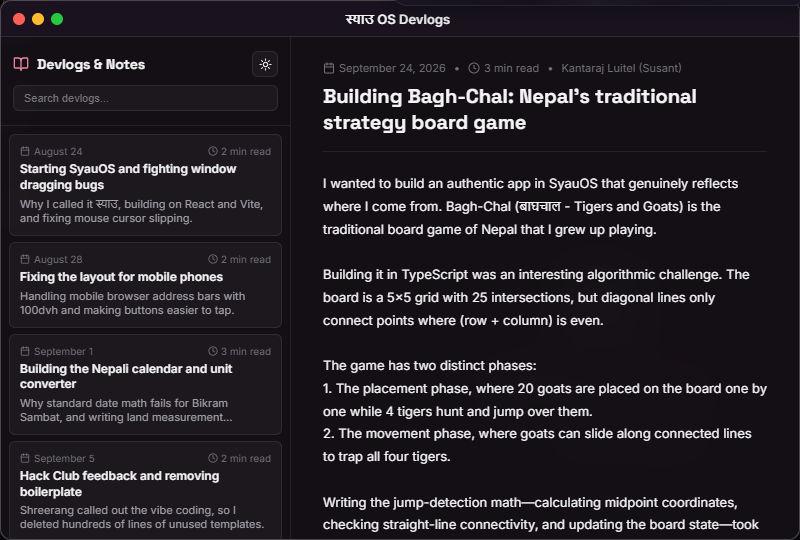
Indexed log reader | Filterable engineering devlogs documenting the development phases, commits, and lessons learned. |
| File Manager | file-manager |
IndexedDB (syau-fs) |
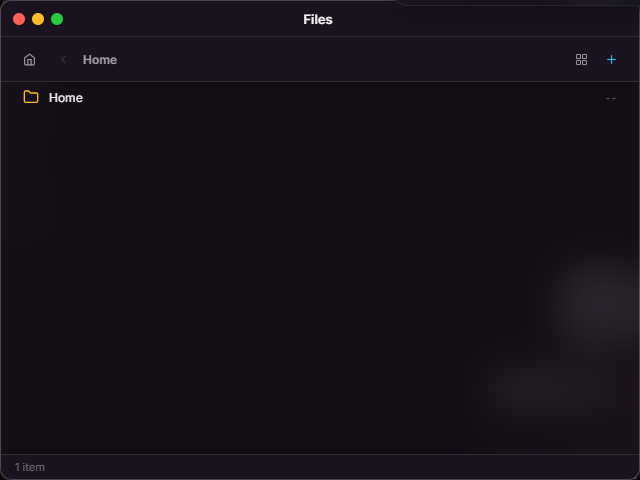
Virtual Unix-like file hierarchy with folder navigation, file inspector, and persistent storage. |
| Gallery | gallery |
Lightbox viewer | Curated wallpaper browser with fullscreen preview and one-click desktop wallpaper application. |
| Music Player | music-player |
Spotify Web Embed | Curated music deck with playlist switcher for focus, lo-fi, and cultural music. |
| Settings | settings |
themeStore.ts |
Theme customizer (dark/light, Rhododendron & Himalayan Sky accents), dock position, and wallpaper selector. |
| About Me | about-me |
Portfolio modal | Interactive bio, technical certifications, awards, and project contact links. |
| Guide | guide |
Markdown documentation | Keyboard shortcuts directory, application overview, and operating system documentation. |
4. The Nepali Applications
The defining feature of SyauOS is its collection of culturally focused tools.
1. बाघचाल (Bagh-Chal: Tigers and Goats)
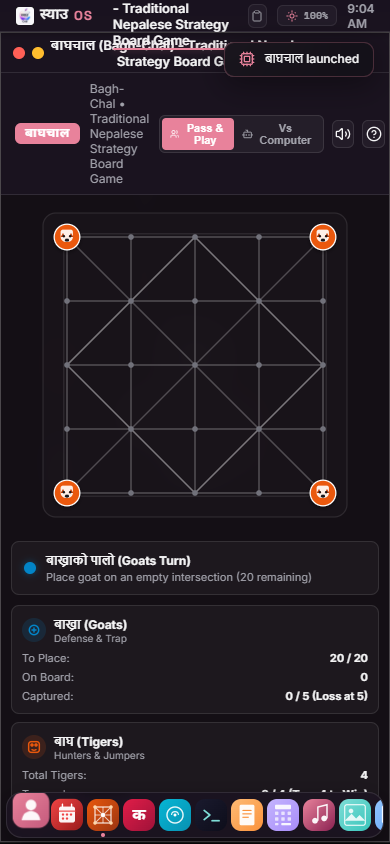
Bagh-Chal is Nepal's national board game. It is an asymmetric two-player game played on a 5x5 grid with 25 intersections. Four tigers start at the four corners, while twenty goats are placed on the board one by one.
The implementation in src/apps/BaghChal.tsx models:
- Two distinct phases: the placement phase (where goats enter the board and tigers hunt) and the movement phase (where goats slide along valid connections to surround and trap the tigers).
- Accurate diagonal movement validation (only 13 of the 25 points have diagonal tracks).
- Straight-line jump capture detection for tigers.
- Procedural sound effects for placing pieces, sliding, jump captures, and game-over states.
- Two gameplay modes: pass-and-play and solo mode against an automated tiger bot.
2. नेपाली पात्रो (Bikram Sambat Calendar Engine)
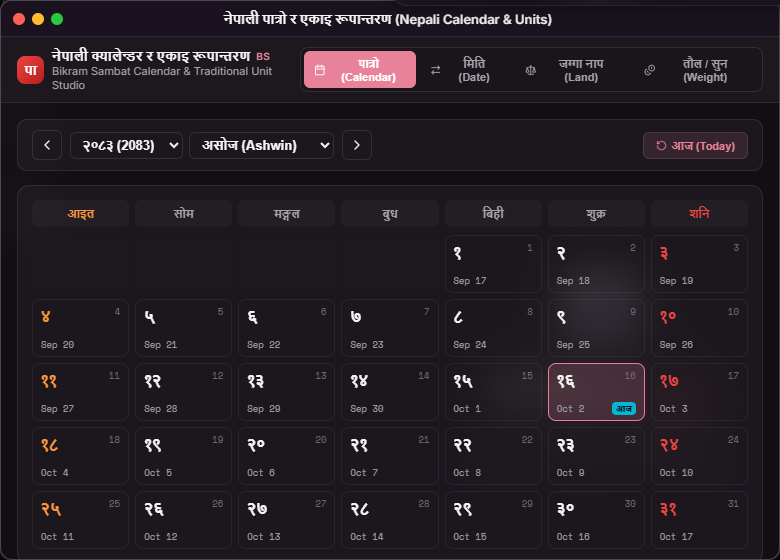
Nepal officially uses the Bikram Sambat (BS) solar calendar, which is approximately 56 years and 8.5 months ahead of the Gregorian calendar. The application src/apps/NepaliConverter.tsx provides:
- An interactive monthly calendar grid displaying Devanagari numerals, Nepali month names (Baishakh to Chaitra), and the 6 traditional Nepali seasons (Ritu: Basanta, Grishma, Barsha, Sharad, Hemanta, Shishir).
- Bi-directional date conversion between Gregorian (AD) and Bikram Sambat (BS).
- Support for fast navigation between years 2075 BS and 2090 BS.
3. Traditional Land and Gold Unit Converters
Land in Nepal is measured using two regional systems that do not use standard decimal steps:
- Pahad (Hilly regions including Kathmandu): Ropani, Aana, Paisa, Daam.
- Terai (Southern plains): Bigha, Kattha, Dhur, Kanwa.
The app provides live bi-directional conversion between these units, square feet, square meters, and acres using exact mathematical formulas. It also includes traditional gold weight conversions between Tola, Lal, and grams.
4. स्याउ टाइप (Syau Type)
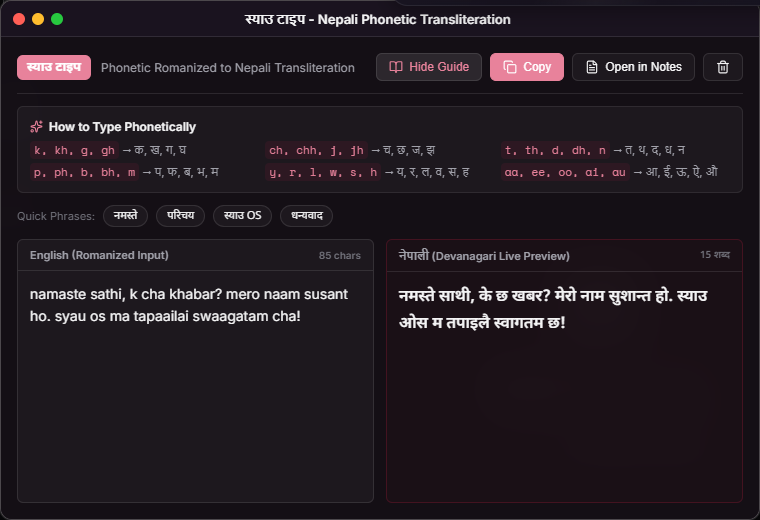
Syau Type (src/apps/SyauType.tsx) is a phonetic Romanized-to-Devanagari typing engine. Typing colloquial phonetic English (such as namaste sathi, k cha?) produces instant Devanagari script (नमस्ते साथी, के छ?).
The application features:
- Dual-pane layout (Romanized input on the left, live Devanagari preview on the right).
- Character and word count trackers.
- Pre-configured quick-phrase buttons for common greetings.
- One-click clipboard copying.
- Direct export into the persistent Notes application.
5. Notes Scratchpad & In-Browser Code Runner
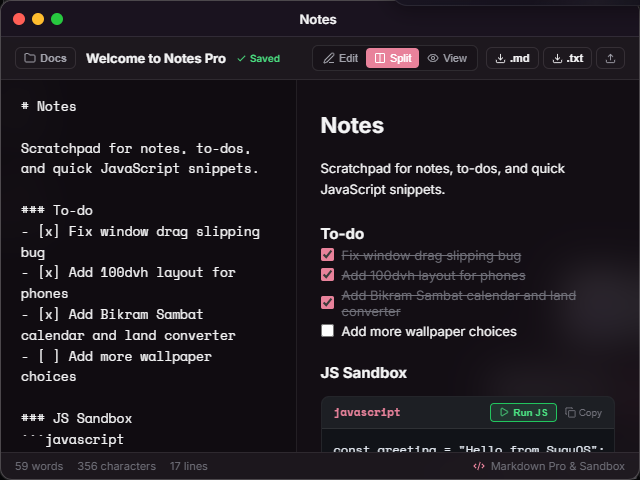
Notes (src/apps/Notes.tsx) provides markdown note-taking with live preview, to-do tracking, and a sandboxed client-side JavaScript execution environment for rapid prototyping.
5. Building a Desktop Inside a Browser
Transforming a browser tab into a desktop operating system requires solving several classic GUI problems: coordinate tracking, elevation stacking, pointer capture, and boundary snapping.
1. State Model and Elevation Stacking
In src/store/desktopStore.ts, every window is represented by a structured TypeScript interface:
export interface WindowState {
  id: string
  appId: string
  title: string
  x: number
  y: number
  width: number
  height: number
  minimized: boolean
  maximized: boolean
  zIndex: number
  workspace: number
  origin?: { x: number; y: number }
  prevBounds?: { x: number; y: number; width: number; height: number }
}
When a user clicks anywhere on a window, the store increments nextZIndex and elevates the targeted window:
focusWindow: (id) => set(state => ({
  windows: state.windows.map(w =>
    w.id === id ? { ...w, zIndex: state.nextZIndex } : w
  ),
  activeWindowId: id,
  nextZIndex: state.nextZIndex + 1,
}))
This guarantees that the most recently clicked window always appears above others.
2. Window Dragging and Pointer Capture
Early in development, window dragging suffered from a common bug: if the user moved the mouse too quickly, the pointer left the titlebar div. The element stopped receiving mousemove events, and the window froze mid-drag.
To fix this, src/components/Window.tsx attaches mousemove and mouseup listeners directly to the global window object when dragging begins:
const onHeaderMouseDown = useCallback((e: React.MouseEvent) => {
  if (isMobile) return
  if ((e.target as HTMLElement).closest('button')) return
  e.preventDefault()

  focusWindow(win.id)

  dragOffset.current = { x: e.clientX - win.x, y: e.clientY - win.y }
  dragPos.current = { x: win.x, y: win.y }
  setDragging(true)
  document.body.style.userSelect = 'none'
  document.body.style.cursor = 'grabbing'
}, [win.x, win.y, win.id, isMobile, focusWindow])

useEffect(() => {
  if (!dragging) return

  const onMouseMove = (e: MouseEvent) => {
    const currentX = Math.max(-win.width + 100, Math.min(window.innerWidth - 80, e.clientX - dragOffset.current.x))
    const currentY = Math.max(34, Math.min(window.innerHeight - 50, e.clientY - dragOffset.current.y))

    dragPos.current = { x: currentX, y: currentY }
    if (winRef.current) {
      winRef.current.style.left = `${currentX}px`
      winRef.current.style.top = `${currentY}px`
    }

    const zone = getSnapZone(e.clientX, e.clientY)
    setActiveSnapZone(zone)
  }

  const onMouseUp = (e: MouseEvent) => {
    setDragging(false)
    document.body.style.userSelect = ''
    document.body.style.cursor = ''

    const finalZone = getSnapZone(e.clientX, e.clientY)
    setActiveSnapZone(null)
    if (finalZone) {
      snapWindow(win.id, finalZone)
    } else {
      updateWindowPosition(win.id, dragPos.current.x, dragPos.current.y)
    }
  }

  window.addEventListener('mousemove', onMouseMove, { passive: true })
  window.addEventListener('mouseup', onMouseUp)
  return () => {
    window.removeEventListener('mousemove', onMouseMove)
    window.removeEventListener('mouseup', onMouseUp)
  }
}, [dragging, win.id, win.width, getSnapZone, snapWindow, updateWindowPosition])
Directly modifying winRef.current.style.left and style.top during movement avoids triggering React component re-renders on every single mouse frame. React state is updated only once when mouseup fires.
3. Edge Snapping with Frosted Glass Previews
When dragging a window near the edges of the display:
- Dragging to the top boundary (
clientY <= 34) triggers full-screen maximization. - Dragging to the left edge (
clientX <= 24) triggers a left 50% split. - Dragging to the right edge (
clientX >= window.innerWidth - 24) triggers a right 50% split.
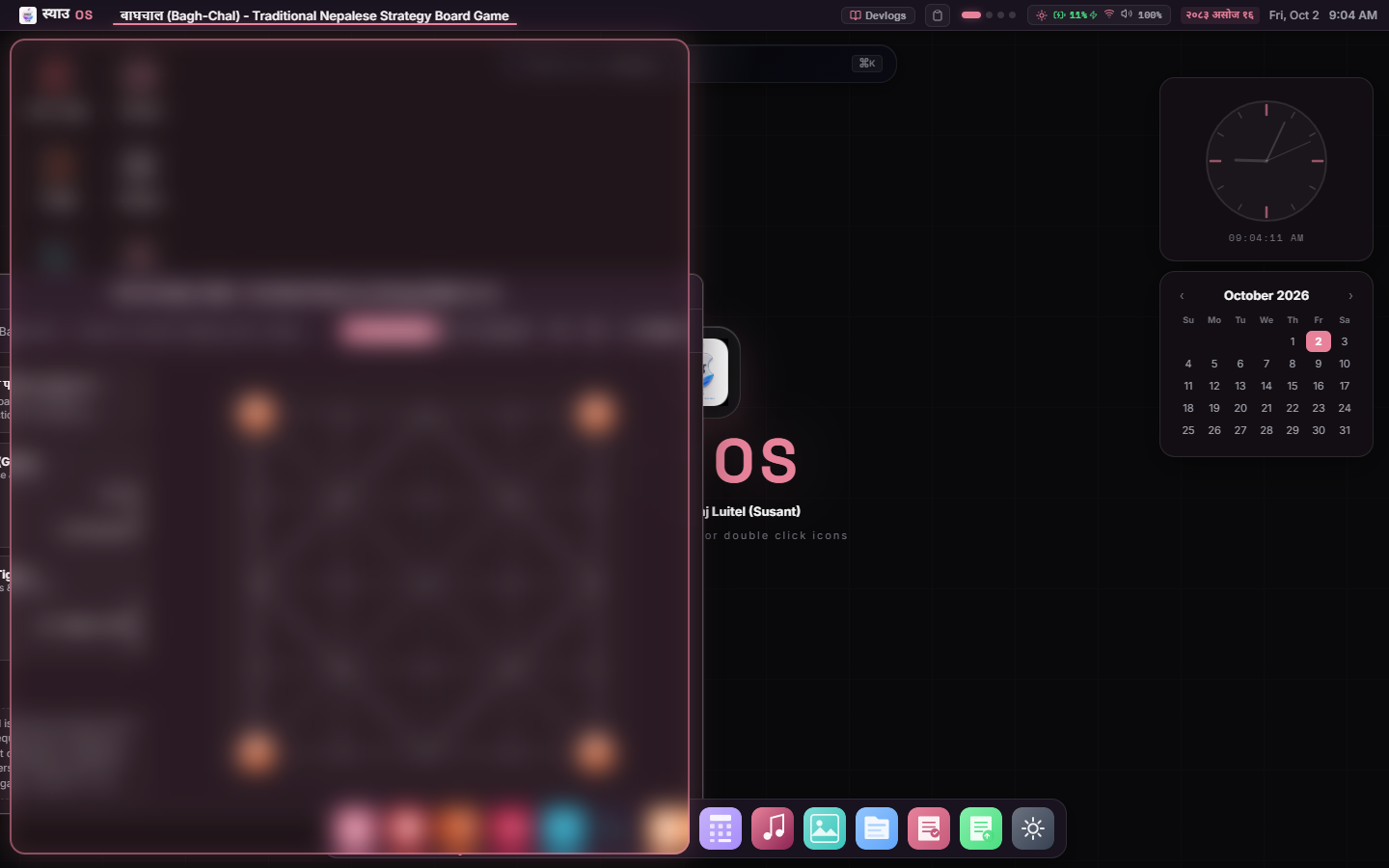
While hovering in a snap zone, a React portal renders a glowing frosted-glass overlay onto document.body, previewing where the window will dock.
4. Virtual Workspaces
SyauOS supports four independent workspaces. Windows store a workspace number (1–4). The application renderer in App.tsx filters visible windows based on the store's currentWorkspace:
<AnimatePresence>
  {windows.filter(w => w.workspace === currentWorkspace).map(win => {
    const AppComponent = APP_COMPONENTS[win.appId]
    if (!AppComponent) return null
    return (
      <Window key={win.id} window={win}>
        <ErrorBoundary>
          <Suspense fallback={null}>
            <AppComponent />
          </Suspense>
        </ErrorBoundary>
      </Window>
    )
  })}
</AnimatePresence>
Users switch between workspaces using Ctrl+1 through Ctrl+4 or Ctrl+ArrowLeft / Ctrl+ArrowRight. Inactive windows stay in memory without taking up screen real estate.
6. The Bagh-Chal Game Engine
The game logic for Bagh-Chal (src/apps/BaghChal.tsx) was one of the most interesting algorithmic challenges in the project.
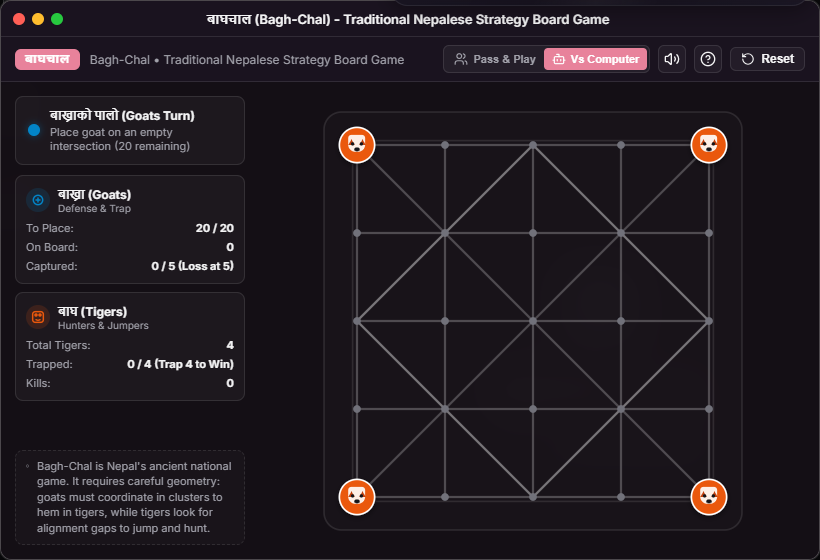
(0,0)---(0,1)---(0,2)---(0,3)---(0,4)
  | \     |     / | \     |     / |
(1,0)---(1,1)---(1,2)---(1,3)---(1,4)
  |     / | \     |     / | \     |
(2,0)---(2,1)---(2,2)---(2,3)---(2,4)
  | \     |     / | \     |     / |
(3,0)---(3,1)---(3,2)---(3,3)---(3,4)
  |     / | \     |     / | \     |
(4,0)---(4,1)---(4,2)---(4,3)---(4,4)
1. Board Geometry and Diagonal Rules
The board consists of a 5x5 grid with 25 vertices. Orthogonal movement is permitted between all adjacent vertices. However, diagonal movement is only valid on alternating intersections where (row + col) is even:
export function hasDiagonal(r: number, c: number): boolean {
  return (r + c) % 2 === 0
}
Neighbor calculation checks this condition:
export function getNeighbors(r: number, c: number): Coord[] {
  const neighbors: Coord[] = []
  const orth: Coord[] = [[r - 1, c], [r + 1, c], [r, c - 1], [r, c + 1]]
  for (const [nr, nc] of orth) {
    if (isValidPoint(nr, nc)) neighbors.push([nr, nc])
  }

  if (hasDiagonal(r, c)) {
    const diag: Coord[] = [
      [r - 1, c - 1], [r - 1, c + 1],
      [r + 1, c - 1], [r + 1, c + 1],
    ]
    for (const [nr, nc] of diag) {
      if (isValidPoint(nr, nc) && hasDiagonal(nr, nc)) {
        neighbors.push([nr, nc])
      }
    }
  }
  return neighbors
}
2. Tiger Jump Captures
A tiger can capture a goat by jumping over an adjacent goat into an empty intersection directly along the same vector:
export function getTigerJumps(board: Piece[][], r: number, c: number): TigerJump[] {
  const jumps: TigerJump[] = []
  const neighbors = getNeighbors(r, c)

  for (const [midR, midC] of neighbors) {
    if (board[midR][midC] === 'G') {
      const dr = midR - r
      const dc = midC - c
      const destR = r + 2 * dr
      const destC = c + 2 * dc

      if (isValidPoint(destR, destC) && board[destR][destC] === null) {
        if (dr !== 0 && dc !== 0) {
          if (hasDiagonal(r, c) && hasDiagonal(destR, destC)) {
            jumps.push({ target: [destR, destC], captured: [midR, midC] })
          }
        } else {
          jumps.push({ target: [destR, destC], captured: [midR, midC] })
        }
      }
    }
  }
  return jumps
}
3. The Greedy Tiger Bot
For single-player mode, the game includes a bot that controls the tigers:
- It searches all 4 tigers for valid moves (both single-step moves and jump captures).
- If any jump captures exist, it prioritizes a capture immediately.
- If multiple captures exist, it picks one at random.
- If no captures are available, it selects a random legal neighbor step.
While not a full minimax search with alpha-beta pruning, this greedy heuristic provides an immediate, responsive opponent that punishes unprotected goats without slowing down the browser thread.
7. Making Nepali Typing Work in the Browser
Traditional Nepali computer typing relied on font-substitution encodings like Preeti, where English letters map arbitrarily to Devanagari glyphs (for example, typing k produces क, but typing complex conjuncts requires memorizing dozens of non-intuitive key combinations).
In src/utils/nepaliTranslit.ts, I wrote a phonetic parser that translates Romanized English into Unicode Devanagari in real time.
export function transliterateWord(rawWord: string): string {
  if (!rawWord) return ''
  const clean = rawWord.toLowerCase()

  // 1. Direct conversational word dictionary overrides
  if (WORD_MAP[clean]) {
    return WORD_MAP[clean]
  }

  let result = ''
  let i = 0
  const len = clean.length

  while (i < len) {
    const ch = clean[i]
    if (!/[a-z]/.test(ch)) {
      result += ch
      i++
      continue
    }

    // 2. Greedy consonant matching (longest match first: 3, 2, 1)
    let foundConsonant = ''
    let consonantKey = ''
    for (const testLen of [3, 2, 1]) {
      if (i + testLen <= len) {
        const sub = clean.slice(i, i + testLen)
        if (CONSONANTS[sub]) {
          foundConsonant = CONSONANTS[sub]
          consonantKey = sub
          break
        }
      }
    }

    if (foundConsonant) {
      i += consonantKey.length

      // 3. Look ahead for dependent vowel signs (matras)
      let foundMatra: string | null = null
      let matraKey = ''
      for (const vLen of [2, 1]) {
        if (i + vLen <= len) {
          const subV = clean.slice(i, i + vLen)
          if (MATRAS[subV] !== undefined) {
            foundMatra = MATRAS[subV]
            matraKey = subV
            break
          }
        }
      }

      if (foundMatra !== null) {
        result += foundConsonant + foundMatra
        i += matraKey.length
      } else {
        // 4. If followed immediately by another consonant, insert halanta (virama)
        if (i < len && /[a-z]/.test(clean[i])) {
          result += foundConsonant + '्'
        } else {
          result += foundConsonant
        }
      }
      continue
    }

    // 5. Standalone independent vowels
    let foundVowel = ''
    let vowelKey = ''
    for (const vLen of [2, 1]) {
      if (i + vLen <= len) {
        const subV = clean.slice(i, i + vLen)
        if (INDEPENDENT_VOWELS[subV]) {
          foundVowel = INDEPENDENT_VOWELS[subV]
          vowelKey = subV
          break
        }
      }
    }

    if (foundVowel) {
      result += foundVowel
      i += vowelKey.length
      continue
    }

    result += ch
    i++
  }

  return result
}
The outer function transliterateText splits full text blocks across whitespace and punctuation using regex capture groups (\s+|[.,!?;:()[\]{}<>"/\\-]), allowing users to type paragraphs with punctuation preserved.
8. Making Sound Without a Backend
Loading MP3 or WAV audio assets over the network adds latency, increases bundle size, and breaks when offline. SyauOS synthesizes its soundscapes directly in the client using the browser's Web Audio API.
1. Kathmandu Monsoon Rain
Monsoon rain is synthesized by filling an AudioBuffer with two seconds of random white noise, looping it continuously, and routing it through a low-pass biquad filter centered at 800 Hz:
const bufferSize = ctx.sampleRate * 2
const buffer = ctx.createBuffer(1, bufferSize, ctx.sampleRate)
const data = buffer.getChannelData(0)
for (let i = 0; i < bufferSize; i++) {
  data[i] = (Math.random() * 2 - 1) * 0.4
}
const noise = ctx.createBufferSource()
noise.buffer = buffer
noise.loop = true

const filter = ctx.createBiquadFilter()
filter.type = 'lowpass'
filter.frequency.setValueAtTime(800, ctx.currentTime)

noise.connect(filter)
filter.connect(trackGain)
noise.start()
2. Himalayan Campfire Crackle
A campfire crackle needs intermittent sharp clicks rather than continuous noise. The audio buffer is populated with random impulses where only 0.3% of samples contain values, routed through a bandpass filter centered at 1400 Hz:
const bufferSize = ctx.sampleRate * 3
const buffer = ctx.createBuffer(1, bufferSize, ctx.sampleRate)
const data = buffer.getChannelData(0)
for (let i = 0; i < bufferSize; i++) {
  data[i] = Math.random() < 0.003 ? (Math.random() * 2 - 1) * 0.9 : 0
}
const crackle = ctx.createBufferSource()
crackle.buffer = buffer
crackle.loop = true

const filter = ctx.createBiquadFilter()
filter.type = 'bandpass'
filter.frequency.setValueAtTime(1400, ctx.currentTime)
filter.Q.setValueAtTime(1.8, ctx.currentTime)

crackle.connect(filter)
filter.connect(trackGain)
crackle.start()
3. Binaural Theta Beats
For focus sound, two separate sine oscillators run at 216 Hz and 220 Hz. When played together, the 4 Hz frequency difference creates an acoustic beat frequency perceived as a gentle theta rhythm.
9. Building the Terminal Shell (syau-sh)
The built-in terminal (src/apps/Terminal.tsx) is an interactive shell with 21 supported commands. Rather than acting as a simple text log, it communicates directly with the desktop environment.
1. Process Inspection with ps and kill
The ps command queries the window manager's state directly:
if (command === 'ps') {
  const wins = useDesktopStore.getState().windows
  let out = 'PID   APPLICATION       WORKSPACE   STATUS\n'
  out +=    '------------------------------------------\n'
  wins.forEach((w, idx) => {
    const pid = String(1000 + idx).padEnd(6)
    const app = (w.appId || 'app').slice(0, 16).padEnd(18)
    const ws = `WS ${w.workspace}`.padEnd(12)
    const st = (w.minimized ? 'MINIMIZED' : 'ACTIVE')
    out += `${pid}${app}${ws}${st}\n`
  })
  out += `\nTotal windows open: ${wins.length}`
  newLines.push({ text: out, type: 'output' })
}
The user can terminate any running window from the shell using kill <appId | title>, which dispatches closeWindow(foundWin.id) through Zustand.
2. Launching Native Applications
Typing baghchal, type, audio, nepali, or calc immediately invokes openWindow with calibrated window dimensions.
3. System Specs with neofetch
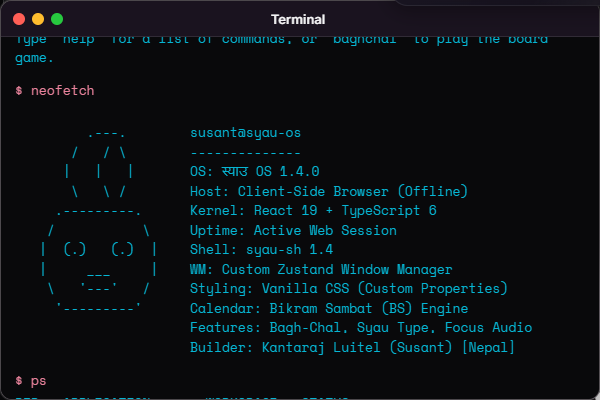
Typing neofetch displays an ASCII art SyauOS logo alongside system architecture details (React 19, TypeScript 6, Zustand window manager, and client-side offline execution).
10. Designing the UI: Modular Vanilla CSS
SyauOS does not use Tailwind CSS, CSS modules, or CSS-in-JS libraries. The interface is styled using modular vanilla CSS organized into scoped stylesheets:
src/styles/
├── variables.css      # CSS custom properties for themes and optical tokens
├── base.css           # Resets, typography, and custom pill scrollbars
├── desktop.css        # Desktop wallpaper surface and grid layout
├── topbar.css         # Top menu bar, dropdown menus, and system status trays
├── window.css         # Window frame, traffic light buttons, and 8 resize grips
├── dock.css           # Floating dock, magnification physics, active indicator dots
├── context-menu.css   # Desktop right-click menus and toast notifications
└── apps.css           # Shared styles for Terminal, Calculator, and Notes
1. Dynamic Theming via Custom Properties
Theme colors are defined as CSS variables in src/styles/variables.css:
:root, [data-theme="dark"] {
  --color-cream: #09090b;
  --color-sakura: #e11d48;
  --color-sakura-deep: #be123c;
  --color-window-bg: rgba(24, 24, 27, 0.94);
  --color-window-header: rgba(32, 32, 36, 0.98);
  --color-text-primary: #f4f4f5;
  --color-text-secondary: #a1a1aa;
  --color-border: rgba(255, 255, 255, 0.1);
  --radius-window: 12px;
  --radius-dock: 16px;
}

[data-theme="light"] {
  --color-cream: #f4f4f5;
  --color-window-bg: rgba(255, 255, 255, 0.96);
  --color-window-header: rgba(244, 244, 245, 0.98);
  --color-text-primary: #18181b;
  --color-text-secondary: #52525b;
  --color-border: rgba(0, 0, 0, 0.12);
}
Toggling the theme mode merely updates data-theme on document.documentElement. The browser recomputes surface colors instantly without requiring individual component re-renders.
2. Dock Magnification Physics
In src/components/Dock.tsx, hovering over the dock calculates icon scaling using a cosine-squared curve over a 135px influence distance:
const dist = Math.abs(mouseCoord - itemCenter)
if (dist < maxDist) {
  const norm = dist / maxDist
  const factor = Math.cos((norm * Math.PI) / 2) ** 2
  const scale = 1 + maxScale * factor
  el.style.transform = `translate3d(0, ${-maxTranslate * factor}px, 0) scale(${scale})`
}
On devices with touch pointers, the magnification calculation is disabled using window.matchMedia('(pointer: coarse)').matches.

11. Making It Work on Mobile Screens
Desktop metaphors typically break on mobile screens. Adapting SyauOS to smartphones required four specific changes:
- Dynamic Viewport Height (
100dvh): Mobile address bars slide in and out as the user scrolls, causing standard100vhlayouts to jump. Setting the main OS viewport to100dvhprevents this layout shift. - Automatic Window Maximization: In
src/styles/window.css, screens under 768px wide automatically maximize open windows to fill the display:@media (max-width: 768px) { .window { left: 0 !important; top: 32px !important; width: 100vw !important; height: calc(100dvh - 32px) !important; border-radius: 0 !important; } } - Enlarged Touch Targets: Traffic light buttons are 12px wide on desktop. On mobile, invisible padding increases the clickable area to 30px so finger taps register reliably.
- Touch Conflict Prevention: Window dragging and 8-point resize handles are disabled on mobile viewports to prevent touch scrolling gestures inside apps from moving the window frame.
12. What Went Wrong (Mistakes, Fixes, and Lessons)
Engineering SyauOS involved several mistakes and redesigns. The git commit logs and devlogs document the real hurdles encountered:
1. The "Vibe Coding" Reality Check
- Problem: Early in the project, I relied on LLM code prompts to generate starter applications. This produced bloated boilerplate, including a 1,000-line canvas particle studio app that I did not write and could not explain.
- Investigation: Shreerang reviewed SyauOS in the Hack Club community and pointed out that the project felt "vibe coded" with artificial filler apps.
- Fix: I went through the repository and deleted all unverified templates, the dummy browser, and the canvas particles (commit
63bdab0). - Lesson: Understanding every line in your codebase is worth far more than having a dozen shallow features.
2. The AI Chatbot Dilemma
- Problem: I initially included an AI assistant powered by the Gemini API, requiring an API key field in Settings.
- Investigation: Having an API prompt box made the entire operating system look like an API wrapper rather than an engineering project.
- Fix: I removed the external Gemini API integration and deleted all external chat calls (commit
8b8afbdandDevlog 5). I redirected focus to authentic local utilities (Bagh-Chal, calendar math, phonetic typing). - Lesson: Authentic local utilities create a far more compelling user experience than a generic chat prompt.
3. Fighting Tailwind Specificity in Window Layouts
- Problem: I started building the UI with Tailwind utility classes. As window drag math, dynamic z-indices, custom titlebars, and theme overrides multiplied, Tailwind classes clashed with dynamic coordinate calculations.
- Investigation: Debugging conflicting utility class specificity inside deeply nested components was slowing development down.
- Fix: I stripped Tailwind completely (commit
23785a5andDevlog 6) and rewrote the stylesheet by hand using CSS custom properties. - Lesson: Scoped vanilla CSS with CSS variables is often much easier to maintain for complex interactive interfaces than utility frameworks.
13. What I Learned
- Browser APIs Are Surprisingly Capable: You do not need backend servers or multi-megabyte sound libraries to deliver ambient soundscapes, local file trees, or clipboard history. The Web Audio API, IndexedDB, and modern browser events provide deep system-level capabilities directly in the client.
- State Modeling Demands Discipline: A desktop environment has many interconnected moving parts (active windows, dragging offsets, snapping previews, workspaces, themes). Centralizing window coordinates in a single store while letting form inputs handle local state prevents performance bottlenecks.
- Cultural Context Creates Distinct Software: Building tools tailored to my own culture—Bikram Sambat dates, traditional land conversions, and local games—made SyauOS unique and memorable compared to standard portfolio templates.
14. Tech Stack
| Technology | Purpose in SyauOS |
|---|---|
| React 19 | Component architecture, lazy loading, and reactive UI updates |
| TypeScript | Strict typing for board game state, calendar arrays, and window geometry |
| Vite | Fast local development server and optimized production build bundling |
| Zustand | Centralized lightweight state management for windows, themes, battery, and clipboard |
| Framer Motion | Window mount/unmount animations, dock hover transitions, and snap preview overlays |
| Vanilla CSS | Scoped modular stylesheets using CSS custom properties (zero CSS frameworks) |
| Web Audio API | Procedural synthesis for boot chimes, ambient focus soundscapes, and game audio |
| IndexedDB | Transactional persistent storage for the virtual Unix-style file hierarchy |
| Lucide React | Consistent vector iconography following the strict no-emoji rule |
15. Project Structure
syau-os/
├── src/
│   ├── apps/                    # 14 standalone desktop applications
│   │   ├── AboutMe.tsx          # Creator portfolio & certifications
│   │   ├── BaghChal.tsx         # 5x5 strategic board game (Tigers & Goats)
│   │   ├── Calculator.tsx       # Floating keyboard/mouse calculator
│   │   ├── Devlogs.tsx          # Engineering devlogs & notes
│   │   ├── FileManager.tsx      # Virtual file system explorer
│   │   ├── FocusAudio.tsx       # Ambient procedural sound synthesizer
│   │   ├── Gallery.tsx          # Wallpaper manager with lightbox
│   │   ├── Guide.tsx            # OS user guide & documentation
│   │   ├── MusicPlayer.tsx      # Curated music hub with Spotify embeds
│   │   ├── NepaliConverter.tsx  # Bikram Sambat calendar & land/gold converter
│   │   ├── Notes.tsx            # Markdown notepad with in-browser JS execution
│   │   ├── Settings.tsx         # Themes, accent colors, dock position
│   │   ├── SyauType.tsx         # Phonetic transliteration app
│   │   └── Terminal.tsx         # syau-sh interactive shell
│   ├── components/              # Desktop environment components
│   │   ├── BootScreen.tsx       # Boot animation & procedural chime
│   │   ├── ClipboardPopover.tsx # Floating clipboard history tray
│   │   ├── Desktop.tsx          # Desktop canvas, icon grid, wallpaper
│   │   ├── Dock.tsx             # Floating dock with magnification
│   │   ├── LockScreen.tsx       # Idle lock screen with clock
│   │   ├── SearchBar.tsx        # Spotlight launcher (Cmd+K)
│   │   ├── TopBar.tsx           # System menu bar & status trays
│   │   ├── Widgets.tsx          # Desktop analog clock canvas widget
│   │   ├── Window.tsx           # Window frame, drag, resize, snapping
│   │   └── WindowSwitcher.tsx   # Window switcher overlay
│   ├── store/                   # 7 focused Zustand stores
│   │   ├── batteryStore.ts      # Battery status API wrapper
│   │   ├── clipboardStore.ts    # Global clipboard listener & history
│   │   ├── cursorStore.ts       # SVG custom cursor definitions
│   │   ├── desktopStore.ts      # Window manager state & workspaces
│   │   ├── fileSystem.ts        # IndexedDB virtual file system
│   │   ├── networkStore.ts      # Network status & live ping checker
│   │   └── themeStore.ts        # Theme tokens, accents, dock config
│   ├── styles/                  # Scoped modular Vanilla CSS
│   │   ├── variables.css        # CSS custom properties
│   │   ├── window.css           # Window chrome & mobile rules
│   │   ├── dock.css             # Dock layout & hover scaling
│   │   └── topbar.css           # Menu bar styling
│   └── utils/                   # Core math & parsing algorithms
│       ├── nepaliCalendar.ts    # Bikram Sambat data & land math
│       └── nepaliTranslit.ts    # Phonetic transliteration engine
16. Running SyauOS Locally
To run SyauOS on your local machine:
# 1. Clone the repository
git clone https://github.com/susantedit/shayu-OS.git
cd shayu-OS

# 2. Install dependencies
npm install

# 3. Start the development server
npm run dev
Open http://localhost:5173 in your browser.
To run the automated test suite for the calendar engine and store logic:
npm test
17. What I Would Build Next
Planned Next Steps
- Extend Calendar Lookup Tables: Expand
BS_CALENDAR_DATAinnepaliCalendar.tsto include historical years back to 2000 BS and forward past 2090 BS. - Virtual File System Export: Allow users to export their IndexedDB file hierarchy as a downloadable JSON or ZIP archive.
Exploratory Ideas
- Minimax Search for Bagh-Chal: Implement an alpha-beta minimax depth search to make the computer tiger bot a more formidable opponent.
- Audio Recorder: Add an in-browser audio recorder to Focus Audio so users can record and save custom procedural sound mixes.
18. Conclusion
Building SyauOS taught me that modern web technologies have immense untapped power when we step away from bloated templates and cookie-cutter frameworks. By leaning into browser standards, writing modular CSS, and solving concrete math and state problems, you can build software that is fast, engaging, and culturally meaningful.
Explore the live demo or browse the source code on GitHub. Contributions, feedback, and questions are always welcome.
Try SyauOS Live
Open the operating system right in your browser tab without any installation.
Launch SyauOS Desktop