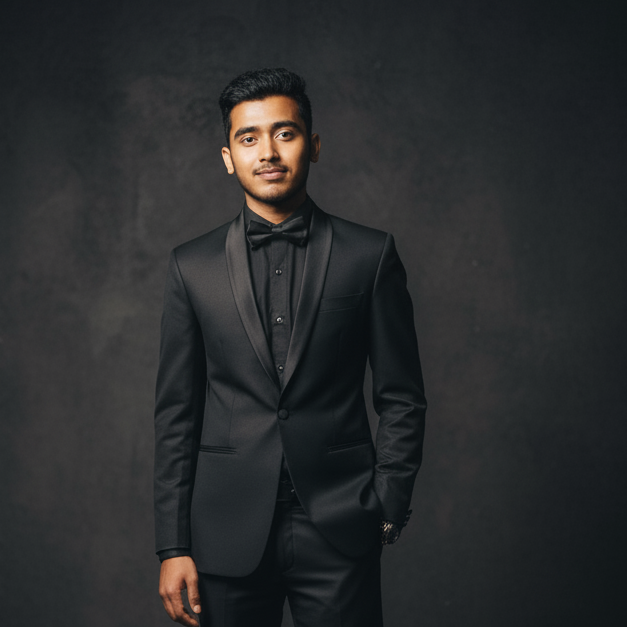
By Kantaraj Luitel (@susantedit) • 10 min read • 🔗 Live Preview Demo • 🎥 Preview Video
"This isn't a simple birthday text message. It's a full 3D interactive museum inside your phone browser."
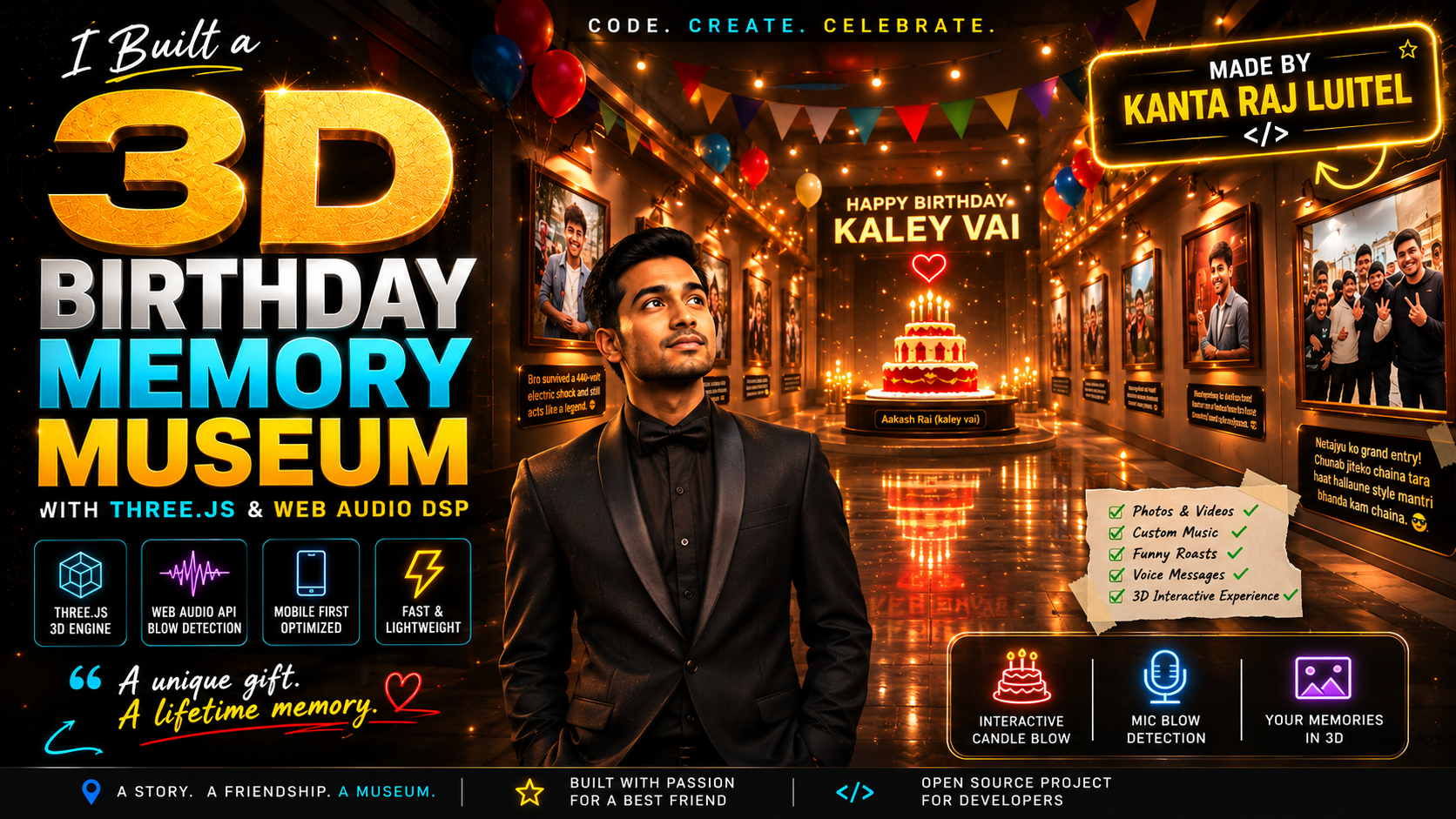
🎥 Preview Video
Introduction: Why a Text Message Wasn't Enough
When your best friend Aakash Rai (affectionately known as "kaley vai") turns a year older, typing "Happy Birthday bro! 🎉" into WhatsApp feels like an insult.
When you've survived years of shared adventures, questionable fashion choices, late-night gaming sessions, and countless embarrassing moments together, a generic message simply doesn't cut it. True friendship, especially between close friends, is built on a sacred foundation: the affectionate birthday roast.
I wanted to give Aakash something he'd never forget, a private, interactive 3D WebGL Museum that he could open on his phone.
Imagine opening a single link on your mobile browser. Suddenly, you're standing in a quiet, warmly lit wooden gallery. As you scroll, photos and videos of your squad float along the walls in high-definition 3D frames. Each photo is accompanied by a custom caption roasting your poses, outfits, and past antics. Ambient party lights pulse across the polished floor in sync with custom background music. At the end of the corridor stands a multi-tiered birthday cake under a spotlight, and to reveal the final birthday letter, you actually have to blow into your phone's microphone to extinguish the candles.
Building this wasn't just a fun weekend project; it was an intense engineering exercise in Three.js graphics optimization, Web Audio signal processing, and desktop-to-static build pipelines.
Here is the complete story of how I built the Birthday Memory Museum, translated the jokes, and solved the technical hurdles of running high-end 3D graphics smoothly on mobile devices.
The Culture of the Friendly Roast: Translating the Inside Jokes
In Nepali youth culture, birthday wishes among close friends are rarely formal. We speak in Neplish (a blend of Nepali and English) packed with sarcasm, pop-culture references, and local political humor.
When building the museum, I wanted every frame along the 3D corridor to hit Aakash with a wave of nostalgia followed by a laugh. Here are a few actual captions directly from the museum codebase and screenshots, translated into English:
Caption 1: The Political Entrance
- Original Neplish Caption:
"Netajyu ko grand entry! Chunab jiteko chhaina tara haat hallaune style mantri bhanda kam chhaina. 😂 HBD bro!"
- English Translation & Context:
"Grand entry of Mr. Politician! He hasn't won a single election yet, but his hand-waving style is no less than a cabinet minister. 😂 Happy Birthday bro!"
- Why it's in the museum: Aakash walked into a party waving at everyone like he was campaigning for public office. Placing this right near the museum entrance sets the tone immediately.
Caption 2: The Shocking Style
- Original Neplish Caption:
"Bro survived a 440-volt electric shock..."
- English Translation & Context:
"Looks like bro just survived a 440-volt electric shock..."
- Why it's in the museum: A candid throwback photograph where his hair was standing completely on end after an unexpected gust of wind during a mountain trip.
Caption 3: The Local Squad Breakdown
- Original Neplish Caption (from the finale letter panel):
"Left ma Messi ko sasto copy, right ma gaun ko Don, ani bich ma hamro Aakash purai harayeko Ward Adhakshya jasto! 🤣 Tin jana ko outfit coordination herda..."
- English Translation & Context:
"On the left, a cheap copy of Lionel Messi; on the right, the local village Don (gangster); and in the middle, our Aakash looking completely lost like a neighborhood ward chairman! 🤣 Looking at the outfit coordination of these three..."
- Why it's in the museum: This caption sits right beside a classic group photo of our trio. It roasts everyone in the frame, comparing our mismatched clothes to an odd coalition of counterfeit athletes and local politicians.
The Engineering Challenge
While the content was fun, the technical constraints were formidably serious:
- Mobile WebGL Texture Constraints: Modern smartphone cameras take 12MP to 48MP photos (4MB to 10MB each). Loading 16 raw JPEGs into a single Three.js WebGL scene consumes hundreds of megabytes of uncompressed GPU VRAM, causing mobile browsers (especially iOS Safari) to crash instantly.
- Microphone Signal Discrimination: Simple Web Audio API volume triggers are useless in real life. If someone laughs, shouts "blow it out!", or if background music is playing, a naive threshold detector fires prematurely. The app needed a Digital Signal Processor (DSP) that could tell the difference between human speech and physical wind turbulence.
- Grazing-Angle Texture Blur: In a long architectural corridor viewed down the camera's Z-axis, floor and wall textures meet the view frustum at extreme grazing angles. Standard WebGL mipmapping renders these as blurry beige gradients unless handled specifically.
- Zero-Config Publishing for Non-Technical Users: The authoring tool needed to run locally on my PC (
http://localhost:4321), process raw media, compile the code, and export a self-contained static site bundle (gift.zip) that could be deployed to Netlify without touching a single cloud server or command-line interface.
What I Built
The Birthday Memory Museum consists of two decoupled architectures:
- The Local Authoring Studio: An Express and Node.js desktop environment (
http://localhost:4321) where you upload media, arrange frame order, write captions, preview the 3D scene live, and trigger automated builds. - The Published Static Viewer: A mobile-optimized, standalone WebGL web app bundled by Vite. It includes compressed WebP asset derivatives, progressive loading scripts, and custom Three.js shaders.
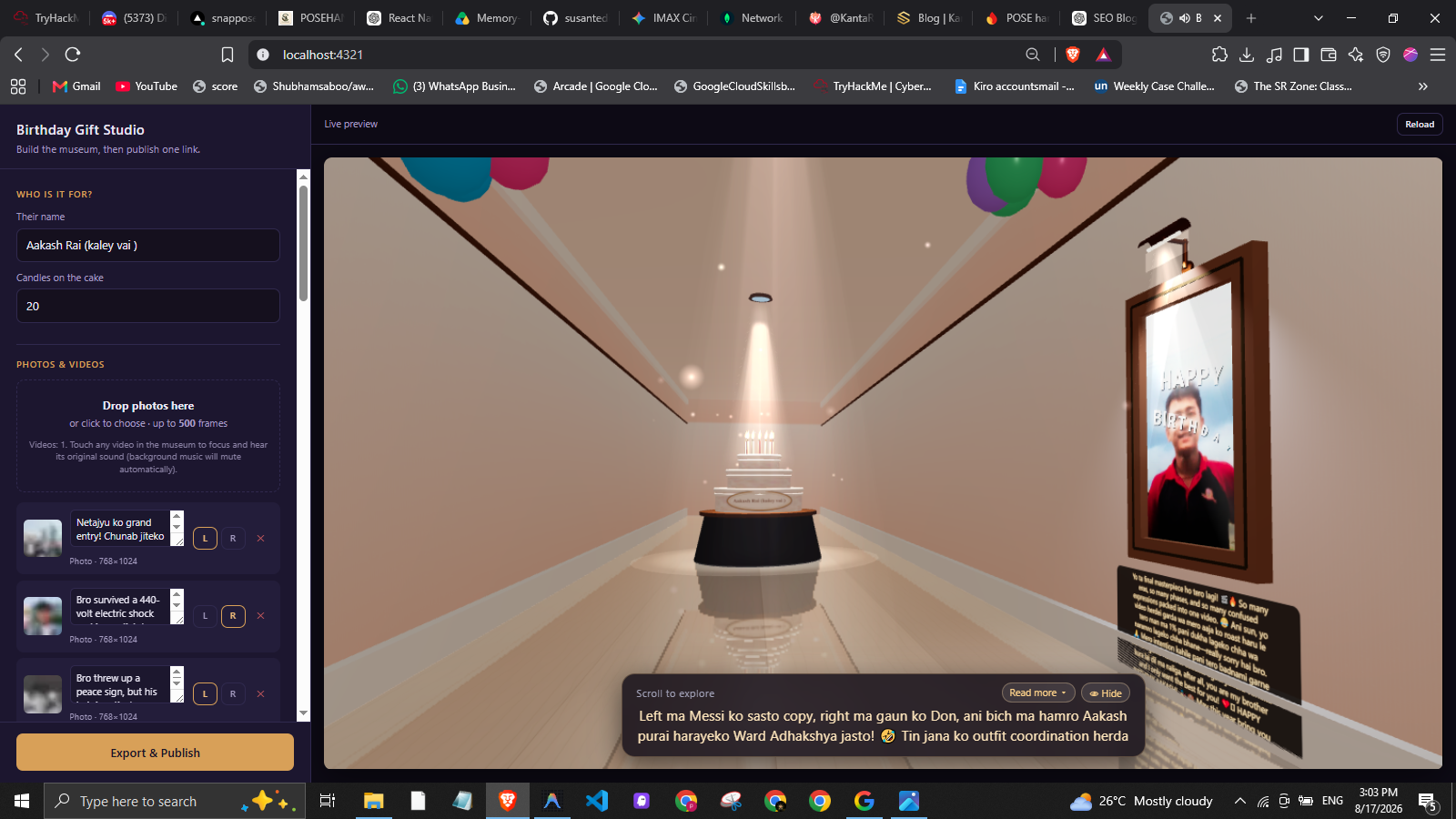 Figure 1: Birthday Gift Studio interface displaying the live 3D gallery corridor preview, custom caption HUD overlay, party banners, and media ordering panel.
Tech Stack
| Layer | Technology | Engineering Purpose |
|---|---|---|
| 3D Rendering | Three.js (0.168.0) |
Scene graph management, custom geometry, lighting, particle dust, smoke, confetti, camera interpolation |
| Bundling Engine | Vite (5.4.11) + Terser |
HMR middleware mode for Studio, tree-shaking, production JS chunk minification |
| Local Backend | Node.js + Express (4.21.2) |
Local REST server, state persistence (state.json), static asset streaming |
| Image Pipeline | Sharp (0.33.5) |
EXIF rotation parsing, WebP encoding, creation of 1024px, 512px, and 32px LQIP derivatives |
| Video Pipeline | Fluent-FFmpeg + ffmpeg-static |
Transcoding raw phone videos to mobile H.264 MP4s and extracting poster stills |
| Audio & Signal DSP | Web Audio API (AudioContext, AnalyserNode) |
Real-time FFT frequency spectrum analysis, spectral flux measurement, acoustic blow classification |
| Archiver & Exporter | Archiver (7.0.1) + qrcode |
Packaging compiled static web assets into gift.zip and SVG QR generation |
How It Works: Interactive System Architecture & Flow
flowchart TD
    subgraph Studio["Local Authoring Studio (Sender PC)"]
        A[User Drag & Drops Photos / Videos / MP3] --> B[Express Server & Multer]
        B --> C[Sharp Image Processing Engine]
        B --> D[FFmpeg Transcoder Pipeline]
        C --> E[Generate WebP Derivatives: Full 1024px, Mid 512px, 32px LQIP]
        D --> F[Generate H.264 MP4 & WebP Poster Stills]
        E --> G[Persist State to state.json]
        F --> G
        G --> H[Vite Bundler & Archiver Engine]
        H --> I[Output dist/ Bundle & gift.zip Archive]
    end

    subgraph Host["Static Hosting Layer"]
        I --> J[Netlify Drop / Netlify CLI Deployment]
        J --> K[Public Shareable HTTPS Static Link]
    end

    subgraph Recipient["Recipient Mobile Phone Browser"]
        K --> L[Fetch gift.json Manifest & LQIP Placeholders]
        L --> M[Execute GPU Benchmark & Hardware Tier Detector]
        M --> N[Initialize Three.js 3D Corridor & Camera Loop]
        N --> O[Web Audio Beat Analysis & Ambient Lighting]
        O --> P[Real-Time Mic Blow Classification DSP]
        P --> Q[Extinguish Candles & Trigger Confetti Finale]
    end
Key Features
1. Dynamic 3D Camera Traversal & Framing
The corridor length scales dynamically based on the frame count. Camera position is tied to page scroll, easing smoothly down the Z-axis while applying subtle rotational turns toward alternating wall frames as they pass through the camera's attention zone.
2. Audio-Reactive Lighting & Particle Physics
The museum environment reacts dynamically to background music. An AnalyserNode computes energy levels across low, mid, and high frequency spectrums. Beat pulses modulate spotlight intensity, wall sconce colors, and ambient airborne dust particle velocity.
3. Acoustic Microphone Blow Detection
Rather than relying on primitive volume thresholds, the museum uses a custom DSP classifier. It evaluates spectral envelope structure, high-frequency sibilance ratios, and temporal flux to distinguish physical wind breath from spoken words or laughter.
4. Adaptive Mobile Hardware Tiering
To guarantee a solid 60 FPS across high-end flagships and budget smartphones alike, the system benchmarks device hardware upon boot. It checks GPU renderer strings (WEBGL_debug_renderer_info), CPU core count (hardwareConcurrency), and device memory, followed by a 450ms runtime frame rate probe (probeFPS) that dynamically toggles post-processing bloom, shadow map resolution, particle counts, and render scales.
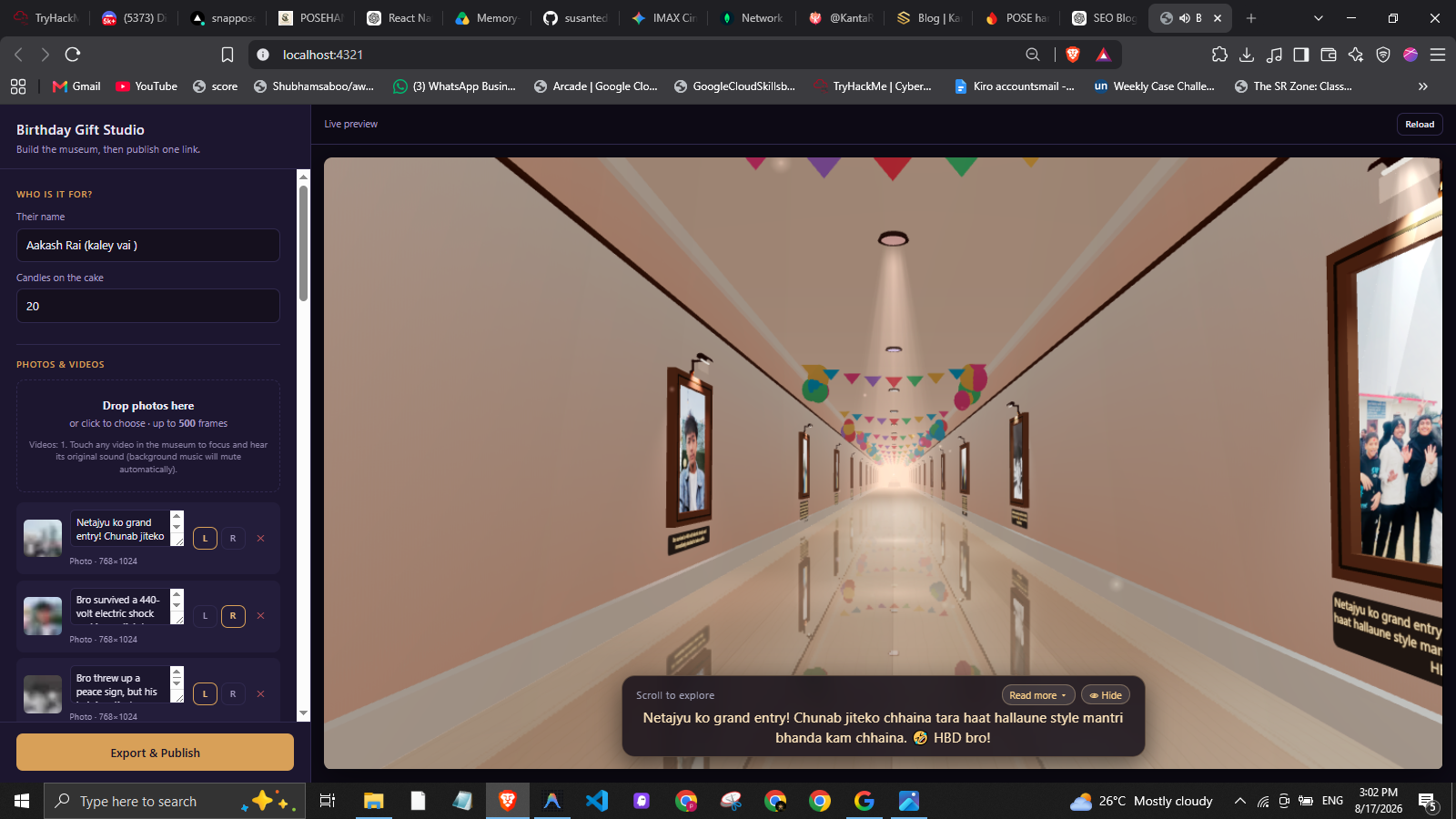 Figure 2: The finale scene approaching the 3D birthday cake pedestal with lit candles, spotlight cone, floating atmospheric particles, and personalized letter preview.
Important Technical Implementation
1. Acoustic Blow Classifier (src/audio/blow.js)
The core technical challenge in mic blow detection is separating wind noise from speech.
- Physical Blow: Broadband low-frequency turbulence across the mic diaphragm with low spectral flux (sustained airflow).
- Speech or Music: Formant peaks, higher spectral centroids, and high frame-to-frame spectral flux (syllabic onsets).
To analyze this accurately, raw FFT decibel bytes are converted into linear amplitude space before computing band averages across low (0 to 500Hz), mid (500 to 2000Hz), and high (2000 to 8000Hz) bands:
// From src/audio/blow.js
// Precomputing byte -> linear amplitude prevents logarithmic decibel compression from flattening band ratios
const LINEAR = new Float32Array(256);
for (let b = 0; b < 256; b++) {
  LINEAR[b] = b === 0 ? 0 : Math.pow(10, (DB_MIN + (b / 255) * (DB_MAX - DB_MIN)) / 20);
}

export function analyseSpectrum(freqData, sampleRate, prevSpectrum) {
  const binCount = freqData.length;
  const hzPerBin = (sampleRate / 2) / binCount;

  const clampBin = (hz) => Math.min(binCount, Math.max(1, Math.round(hz / hzPerBin)));
  const lowCut = clampBin(BAND_LOW_HZ);
  const midCut = Math.max(lowCut + 1, clampBin(BAND_MID_HZ));
  const topCut = Math.max(midCut + 1, clampBin(BAND_TOP_HZ));

  let lowLin = 0, midLin = 0, highLin = 0, loudSum = 0, flux = 0;

  for (let i = 0; i < topCut; i++) {
    const b = freqData[i];
    const lin = LINEAR[b];
    const db = b / 255;

    if (i < lowCut) { lowLin += lin; loudSum += db; }
    else if (i < midCut) { midLin += lin; loudSum += db; }
    else highLin += lin;

    if (prevSpectrum) {
      const d = db - prevSpectrum[i];
      if (d > 0) flux += d;
      prevSpectrum[i] = db;
    }
  }

  const lowMean = lowLin / lowCut;
  const midMean = midLin / (midCut - lowCut);
  const highMean = highLin / (topCut - midCut);
  const meanSum = lowMean + midMean + highMean;

  return {
    level: loudSum / midCut,
    lowRatio: meanSum > 0 ? lowMean / meanSum : 0,
    highRatio: meanSum > 0 ? highMean / meanSum : 0,
    flux: flux / topCut,
  };
}
The classified metrics must pass four simultaneous conditions sustained over 180ms (SUSTAIN_MS):
export function classifyBlow(m, noiseFloor) {
  const threshold = Math.min(0.92, noiseFloor + LEVEL_OVER_FLOOR);

  const checks = {
    loudEnough: m.level > threshold,
    lowDominant: m.lowRatio > 0.34,   // Low band energy must dominate (breath noise)
    notHissy: m.highRatio < 0.38,     // Low sibilance (rejects 'sh' / 'sss' speech sounds)
    sustained: m.flux < 0.09,          // Low spectral flux (rejects rapid speech transients)
  };

  const isBlow = checks.loudEnough && checks.lowDominant && checks.notHissy && checks.sustained;
  const strength = Math.min(1, Math.max(0, (m.level - threshold) / 0.22));

  return { isBlow, strength, threshold, checks };
}
Crucial Takeaway: Native browser audio constraints (
echoCancellation,noiseSuppression,autoGainControl) are explicitly set tofalseduringgetUserMedia()invocation. Operating system drivers treat wind turbulence as unwanted noise and attempt to mute the exact signal required to detect candle blowing!
2. Grazing-Angle Sharpness & Hardware Tiering (src/core/tiers.js)
In a corridor viewed down its main axis, floor and wall planes present at extreme grazing angles relative to the camera vector. Default WebGL mipmapping picks low-detail mipmaps for stretched footprints, smearing floor planks and fabric textures.
We configure tier profiles and prioritize anisotropic filtering (anisotropy: 8) even on low-end hardware:
// From src/core/tiers.js
export const TIERS = {
  LOW: {
    name: 'low',
    texture: 512,
    pixelRatio: 1.5,
    antialias: true,
    bloom: false,
    confetti: 250,
    dust: 1800,
    anisotropy: 8,      // Anisotropic sampling prevents grazing-angle corridor blur
    surfaceTex: 1024,   // Procedural canvas textures generated once at boot
  },
  MID: {
    name: 'mid',
    texture: 1024,
    pixelRatio: 2.0,
    antialias: true,
    bloom: true,
    confetti: 500,
    dust: 3000,
    anisotropy: 8,
    surfaceTex: 1024,
  },
  HIGH: {
    name: 'high',
    texture: 1024,
    pixelRatio: 2.5,
    antialias: true,
    bloom: true,
    confetti: 900,
    dust: 6000,
    anisotropy: 16,
    surfaceTex: 2048,
  }
};
3. EXIF Auto-Rotation & Multi-Tier WebP Pipeline (server/pipeline/images.js)
Raw smartphone JPEGs carry orientation tags in EXIF metadata. GPUs do not parse EXIF metadata, so unrotated images land sideways on 3D meshes.
Our pipeline uses Sharp to apply EXIF rotations directly to pixel buffers before generating three WebP derivatives per photo:
// From server/pipeline/images.js
export async function processImage(srcPath, outDir, slug) {
  // `rotate()` bakes EXIF orientation into the image buffer before resizing
  const base = sharp(srcPath).rotate();

  const outputs = {};
  for (const [key, edge] of Object.entries(SIZES)) {
    const file = key === 'full' ? `${slug}.webp` : `${slug}_${key}.webp`;
    const dest = path.join(outDir, file);

    let pipe = sharp(srcPath)
      .rotate()
      .resize({
        width: edge,
        height: edge,
        fit: 'inside',
        withoutEnlargement: true,
      });

    if (key === 'lqip') {
      pipe = pipe.blur(1.4).webp({ quality: 50 });
    } else {
      pipe = pipe.webp({ quality: 78, effort: 5 });
    }

    const info = await pipe.toFile(dest);
    outputs[key] = { file, w: info.width, h: info.height };
  }

  return {
    type: 'photo',
    src: outputs.full.file,       // 1024px full quality
    src512: outputs.mid.file,    // 512px mid tier for mobile devices
    lqip: outputs.lqip.file,      // 32px blurred placeholder
    w: outputs.full.w,
    h: outputs.full.h,
  };
}
Technical Challenges and Solutions
Challenge 1: Mic Blow Detection False Positives
- Problem: Laughter, spoken jokes, or ambient room noise repeatedly blew out candles prematurely during testing.
- Approach: Examined spectral difference between human vocal formants and wind noise turbulence.
- Solution: Linearized FFT decibel values, enforced
lowRatio > 0.34, cappedhighRatio < 0.38, and required aSUSTAIN_MSwindow of 180ms. - Result: Erroneous triggers eliminated while natural breath reliably extinguishes candles on both Android and iOS devices.
Challenge 2: Mobile Safari VRAM Out-of-Memory Tab Crashes
- Problem: iOS Safari limits WebGL canvas memory. Uploading sixteen 4MB photos exceeded GPU texture memory, causing browser tab reloads.
- Approach: Offloaded image scaling to the local Studio backend and built progressive texture streaming.
- Solution: Studio generates 512px mid-tier WebP images alongside 32px blurred LQIP placeholders. The viewer loads placeholders instantly and streams 512px textures only when frames approach the camera view frustum.
- Result: Reduced GPU memory footprint by over 75%, maintaining steady performance on older iPhones.
Challenge 3: Vite Terser Minification Exception in ESM Scope
- Problem: Calling Vite's programmatic JS build API inside Node.js ES Modules caused Terser to reach for CommonJS
require(), throwing runtime exceptions during export. - Approach: Evaluated isolating the build runner in a sub-process.
- Solution: Isolated the build process by spawning Vite's executable directly with
child_process.spawn(process.execPath, [viteBin, 'build']). - Result: Guaranteed reliable builds across Windows and macOS without module resolution conflicts.
Project Architecture
Birthday Gift/
├── package.json             # Root configuration & scripts (Three.js, Express, Sharp, Vite)
├── vite.config.js           # Build settings pointing to src/viewer entry point
├── server/                  # Local authoring Studio backend
│   ├── index.js             # Express API server, file routes, HMR preview middleware
│   └── pipeline/            # Asset pipeline (images.js, video.js, audio.js, export.js)
├── studio/                  # Authoring UI frontend (Vanilla JS, CSS)
├── src/                     # 3D Museum Viewer codebase
│   ├── viewer/              # Viewer entry point (main.js, index.html)
│   ├── core/                # Engine, hardware tiers, loop, interaction, scroll
│   ├── scene/               # 3D geometry (room, frames, cake, lighting, decor)
│   ├── fx/                  # Render effects (beams, dust, smoke, confetti, reflections)
│   └── audio/               # Web Audio API engines (blow.js, music.js)
└── dist/                    # Output directory for compiled static distribution
How to Run & Deploy the Project
1. Prerequisites
- Node.js (v20 LTS or higher)
- Windows, macOS, or Linux
2. Installation
Clone the repository and install dependencies:
# Clone the repository
git clone https://github.com/susantedit/birthday-special.git
cd birthday-special

# Install project dependencies
npm install
3. Launch the Local Authoring Studio
Start the Studio server:
npm run studio
Open your browser and navigate to:
http://localhost:4321
4. Build & Publish
- Upload photos, videos, custom background music, and write captions.
- Click Export & Publish in the Studio panel.
- Download
gift.zipand drag it onto Netlify Drop to get your live HTTPS URL.
Lessons Learned
- Linear Amplitude vs Decibels in Audio Analysis: Calculating band ratios on raw FFT byte arrays (decibels) severely compresses signal contrast. Converting bytes to linear amplitude (
Math.pow(10, dB / 20)) expands signal resolution, making acoustic classification reliable across diverse hardware. - Anisotropic Filtering is a Game Changer for 3D Rooms: Increasing render resolution on mobile WebGL incurs heavy GPU fill-rate costs. Enabling anisotropic filtering (
anisotropy: 8) sharpens floor and wall textures at extreme camera angles with zero fill-rate overhead. - Always Build Graceful Fallbacks: Web features like microphone access depend on HTTPS contexts and user permissions. Providing a prominent "Tap candle to blow out" fallback ensures the experience remains functional even on desktop computers or restricted browser settings.
Future Enhancements
- Spatial Positional Audio: Add 3D spatial attenuation to frame video clips as the camera scrolls past.
- WebGPU Rendering Pipeline: Implement a WebGPU renderer with WebGL 2.0 fallbacks for higher particle density.
- Procedural Gallery Themes: Support selectable architectural environments (e.g. neon cyberpunk gallery, outdoor garden path, cozy cabin).
Conclusion
Building the Birthday Memory Museum proved that code can be both a high-performance technical discipline and a deeply personal medium for storytelling.
Aakash got a hilarious, unforgettable birthday gift filled with inside jokes, squad roasts, and memories that brought back years of laughs, and I got to engineer a mobile-optimized 3D WebGL architecture that runs at 60 FPS on any phone.
- Live Demo: Experience the 3D Museum Demo
- GitHub Repository: View Source Code on GitHub